Fleet HUD for EDENCOM krabbing
Real-time telemetry and a warp-to-warp anomaly timer.
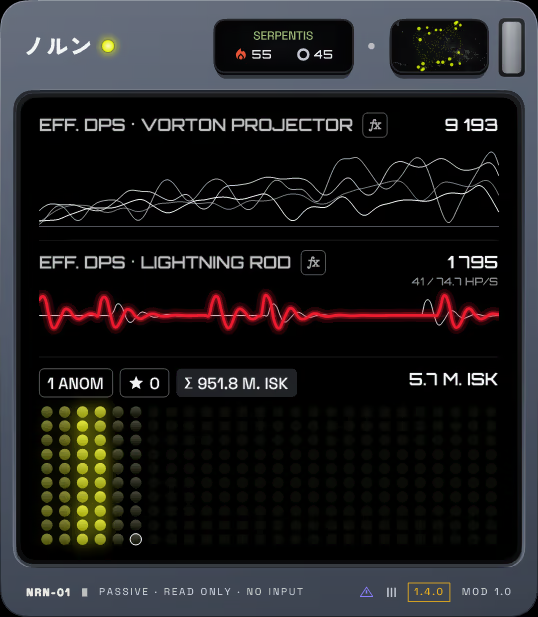


Engineered for nullsec krabbing & Havens.
Replace guesswork with real-time mathematical telemetry. Track individual gunboat efficiency, instant capital alarms, and wallet bounties in the heat of combat.
Minimize to Tray & One-Click Mode Toggle
Two new keys sit left of Close on the hull: minimize glows amber and sends the meter to the Windows notification tray, the mode key glows emerald and switches between compact and full mode in one click.
One-Click Update with SHA-256 Verification
When a newer version is released, the About page offers "Update to …". One click downloads the installer straight from GitHub Releases, verifies its SHA-256 against published checksums, and launches the update while keeping all your settings and statistics.
Interactive Power Display Animations
Settings → Display shows live interactive previews of four animations for the small OLED power display on the hull: the Working sphere, Cube wave, ノルン dot matrix, and Flow field. Click one and the hull display switches at once.
Historical Log Import into Session Statistics
A single button on the Statistics page reads your combat logs (read-only) and retroactively catalogs faction commanders (★), titans, and pirate dreadnoughts into your existing sessions, with zero duplicate counts.
Warp-to-Warp Clear Timer with False Warp Detection
Warp out and the site clear time counts up. Warp again without firing a single shot and the timer turns red, rapidly counting down to 00:00. After two minutes without combat, the fleet is considered idle and the timer stays dark.
Frigate Runner & Lightning Rod Live ECG
In Competition mode, Thunderchilds shoot an agile frigate runner that arcs lightning onto the NPCs. The Lightning rod graph monitors the runner incoming damage against its active repair capacity.
Molten Hull Heating & Audio Sirens
The second an NPC Dreadnought (Guristas, Blood, Sansha, Serpentis, Domination) lands on grid, the hull glows in amber. An NPC Titan turns the hull crimson. Audio alerts can be enabled in Settings → General.

Compact HUD & Low-CPU Potato Mode
Compact mode provides a minimal single-row HUD. Potato mode renders at 5 FPS with zero glow or animations, consuming ~3.5% of a single CPU core even with 10+ EVE clients running.

Read-only data pipeline.
How The Norns gets real-time telemetry: it reads the logs the client already writes. We are not affiliated with CCP and cannot promise how CCP treats third-party tools.
Non-Locking Text Tailing
Reads standard text logs generated by the client in Documents\EVE\logs\Gamelogs using FileShare.ReadWrite. Never locks or alters the file stream.
Zero Process Injection
Completely isolated from exefile.exe. No DLL injection, no memory scraping, no network packet sniffing. The optional Carousel module (off by default) uses a window-focus hook and can bring a client window to the front.
No Input Broadcasting
We designed it around CCP's 1-action-1-input guideline. It displays telemetry only and sends no clicks, keystrokes or broadcasts.
Questions about The Norns.
Which Windows versions does it run on?
Windows 10 and 11. It needs .NET Framework 4.8, which Windows 10 and 11 already include.
Does it need a server or an account?
No. It runs locally, with no account and no server component. The only network request is the optional update check.
What does the update check send?
It asks GitHub for the latest release version. It sends no information about you or your game clients, beyond the normal request to GitHub's API.
How do I turn the update check off?
Settings -> General, or the "Check for updates at start" switch in the installer.
Does it send keystrokes or clicks to the game?
No. The optional Carousel module (off by default) can bring a client window to the front and switch between clients with hotkeys. Nothing else sends input.
Does it read game memory or inject code?
No. It reads the text logs in Documents\EVE\logs\Gamelogs and the titles of the EVE windows. It does not inject DLLs or read process memory.
Where are my settings and session data kept?
In %LOCALAPPDATA%\The Norns. Installing or updating the app keeps them.
Is it allowed on the official servers?
The app does not connect to any server. We cannot promise how CCP treats third-party tools, so read CCP's current policies before you use any tool.
Is it affiliated with CCP?
No. The Norns is a free, open-source, fan-made tool under the MIT license.
Can I see the source code?
Yes. Source code and build guides are openly available.
Which languages does it support?
English, Ukrainian, Spanish, German, Italian, French and Chinese (Simplified). Settings -> General switches the language.
Upgrade your nullsec fleet telemetry today.
Free, open-source, and offline by design, apart from one optional update check. Download the standalone Windows installer or extract the portable archive.