Fleet HUD for EDENCOM krabbing
Real-time telemetry and a warp-to-warp anomaly timer.
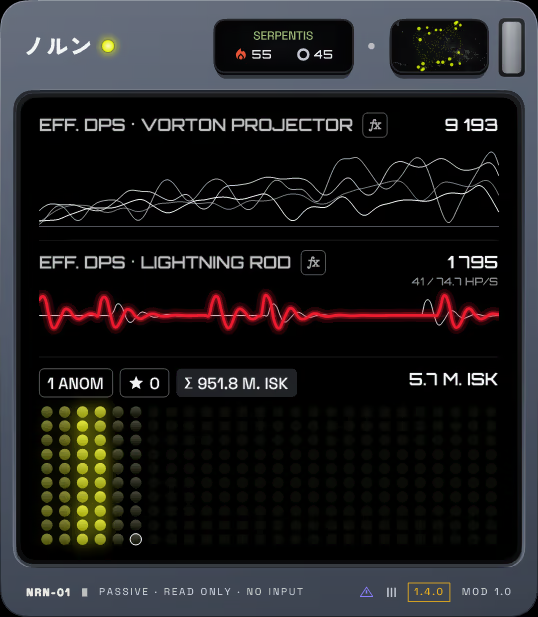


Engineered for nullsec krabbing & Havens.
Replace guesswork with real-time mathematical telemetry. Track individual gunboat efficiency, instant capital alarms, and wallet bounties in the heat of combat.
Runner damage in Competition mode
When several fleets share a system, the Thunderchilds shoot a frigate runner and their Vorton arcs jump on to the NPCs. The Lightning rod trace shows every hit the runner takes, live.
Real-time DPS and bounty tracking
Every pilot's Vorton damage as its own line, the anchor's smartbomb cycles as seven columns, and each bounty tick lighting up the ISK grid. A faction commander on grid adds a star to the session count.
Cursor-lit glass display
The display sits behind real glass. Move the cursor over it and the light picks up faint scratches and wipe marks, soft and diffuse, never over a key.
Capital spawn alarm
A pirate dreadnought on grid heats the hull to amber; a titan turns it crimson. You notice the spawn at a glance, even with the window in the corner of your eye.
Anomaly clear time
When the fleet warps out, the damage lines sink and the site's clear time appears, counted from warp to warp. The first hit in the next site brings the lines back.
Runner damage in Competition mode
When several fleets share a system, the Thunderchilds shoot a frigate runner and their Vorton arcs jump on to the NPCs. The Lightning rod trace shows every hit the runner takes, live.
Settings on the main display
Click the name and the display turns into the settings: General, Display, Modes and Data tabs, with Statistics and About one key away. One typeface, sizes that read well on every page.
Smaller body with the key numbers
A smaller body for a corner of the screen or a second monitor. It keeps the Vorton damage, the smartbombs, the star count and the ISK total, and drops the power display and the printed band.
Read-only data pipeline.
How The Norns gets real-time telemetry: it reads the logs the client already writes. We are not affiliated with CCP and cannot promise how CCP treats third-party tools.
Non-Locking Text Tailing
Reads standard text logs generated by the client in Documents\EVE\logs\Gamelogs using FileShare.ReadWrite. Never locks or alters the file stream.
Zero Process Injection
Completely isolated from exefile.exe. No DLL injection, no memory scraping, no network packet sniffing. The optional Carousel module (off by default) uses a window-focus hook and can bring a client window to the front.
No Input Broadcasting
We designed it around CCP's 1-action-1-input guideline. It displays telemetry only and sends no clicks, keystrokes or broadcasts.
Questions about The Norns.
Which Windows versions does it run on?
Windows 10 and 11. It needs .NET Framework 4.8, which Windows 10 and 11 already include.
Does it need a server or an account?
No. It runs locally, with no account and no server component. The only network request is the optional update check.
What does the update check send?
It asks GitHub for the latest release version. It sends no information about you or your game clients, beyond the normal request to GitHub's API.
How do I turn the update check off?
Settings -> General, or the "Check for updates at start" switch in the installer.
Does it send keystrokes or clicks to the game?
No. The optional Carousel module (off by default) can bring a client window to the front and switch between clients with hotkeys. Nothing else sends input.
Does it read game memory or inject code?
No. It reads the text logs in Documents\EVE\logs\Gamelogs and the titles of the EVE windows. It does not inject DLLs or read process memory.
Where are my settings and session data kept?
In %LOCALAPPDATA%\The Norns. Installing or updating the app keeps them.
Is it allowed on the official servers?
The app does not connect to any server. We cannot promise how CCP treats third-party tools, so read CCP's current policies before you use any tool.
Is it affiliated with CCP?
No. The Norns is a free, open-source, fan-made tool under the MIT license.
Can I see the source code?
Yes. Source code and build guides are openly available.
Which languages does it support?
English, Ukrainian, Spanish, German, Italian, French and Chinese (Simplified). Settings -> General switches the language.
Upgrade your nullsec fleet telemetry today.
Free, open-source, and offline by design, apart from one optional update check. Download the standalone Windows installer or extract the portable archive.